> ## Documentation Index
> Fetch the complete documentation index at: https://magicads.mintlify.site/llms.txt
> Use this file to discover all available pages before exploring further.
# Deepseek Integration
> Enhance your Davinci AI platform with state of the art Deepseek models. This guide explains how to set up and configure Deepseek integration for your platform.
## Introduction
Davinci AI’s Deepseek integration allows you to leverage their latest state of the art models for AI-powered conversations and content generation. This guide will help you set up and manage the Deepseek integration in your platform.
## Available Models and Tools
Davinci AI leverages a wide range of Deepseek models to power various tools and features:
### LLM Text Generation Models
* Deepseek R1
* Deepseek V3
## Connect Deepseek Account
To be able to use your Deepseek API, follow these steps to setup integration.
If you don’t have an Deepseek account, [sign up here](https://www.deepseek.com/en)
Once logged in, navigate to **API Keys** page
Generate a new API key by clicking **Create new API Key**, next copy the generated API key
Keep your API key secure. It provides access to Deepseek’s services and should not be shared publicly.
Login to Davinci AI using your admin credentials.
In **Admin Panel**, navigate to **AI Settings** -> **AI API Keys** tab.
Click on **Deepseek** tab there.
 Include your API key under **Deepseek API Key** input field. Base URL can remain as it is stated there.
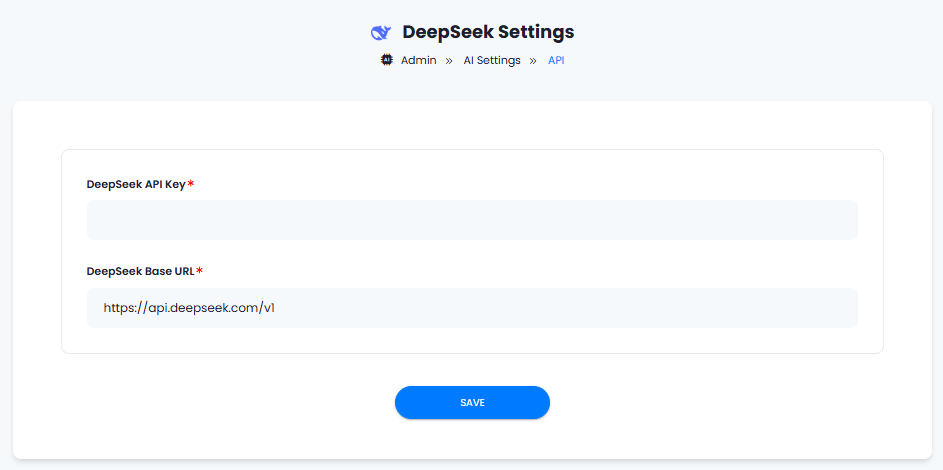 After you are done with configurations, click on **Save** button.
Congratulations! You have successfully comleted the Deepseek setup process.
## Davinci AI Tools Powered by Deepseek
Following AI tools can be used with Deepseek models
Support for more AI tools will be added soon, we are actively working on that
1. **AI Chat** - chat conversations and get instant answers.
2. **AI Writer** - Generate high-quality content for various purposes.
## Best Practices
To make the most of your Deepseek integration:
* Experiment with different models to find the best fit for your use case.
* Use clear and specific prompts to get the most accurate results.
* Monitor your API usage to manage costs effectively.
Available only for Extended License users
After you are done with configurations, click on **Save** button.
Congratulations! You have successfully comleted the Deepseek setup process.
## Davinci AI Tools Powered by Deepseek
Following AI tools can be used with Deepseek models
Support for more AI tools will be added soon, we are actively working on that
1. **AI Chat** - chat conversations and get instant answers.
2. **AI Writer** - Generate high-quality content for various purposes.
## Best Practices
To make the most of your Deepseek integration:
* Experiment with different models to find the best fit for your use case.
* Use clear and specific prompts to get the most accurate results.
* Monitor your API usage to manage costs effectively.
Available only for Extended License users