

29/08/2026
Update process for v2.1
1
Step 1
Go to the Update tab in the Admin Panel, and click on the Install Update button. It will start the upgrade process.
In rare cases upgrade packages can be up to 120MB in size, depending on your Internet bandwidth, download and installation time will vary
2
Step 2
You have successfully completed the upgrade process
24/08/2026
Update process for v2.0
1
Step 1
If you see 500 error in your Update page, do following:
- Go to app/http/Controllers/Admin/ExtensionController.php file and click Edit.
- There you following line at the top:
- Change it to be like this:
- Click Save. This will take care of your 500 error at update page.
2
Step 2
Go to the Update tab in the Admin Panel, and click on the Install Update button. It will start the upgrade process.
In rare cases upgrade packages can be up to 120MB in size, depending on your Internet bandwidth, download and installation time will vary
3
Step 3
After installation of update package is successfully completed, type in your browser:and hit Enter button. It will run the migration and seeder commands for this specific version only behind the scenes to update the database tables with LLM models.
4
Step 4
You have successfully completed the upgrade process
26/07/2026
Update process for v1.9
1
Step 1
Go to the Update tab in the Admin Panel, and click on the Install Update button. It will start the upgrade process.
In rare cases upgrade packages can be up to 120MB in size, depending on your Internet bandwidth, download and installation time will vary
2
Step 2
You have successfully completed the upgrade process
15/07/2026
Update process for v1.8
1
Step 1
Go to the Update tab in the Admin Panel, and click on the Install Update button. It will start the upgrade process.
In rare cases upgrade packages can be up to 120MB in size, depending on your Internet bandwidth, download and installation time will vary
2
Step 2
You have successfully completed the upgrade process
09/07/2026
Update process for v1.7
1
Step 1
Go to the Update tab in the Admin Panel, and click on the Install Update button. It will start the upgrade process.
In rare cases upgrade packages can be up to 120MB in size, depending on your Internet bandwidth, download and installation time will vary
2
Step 2
You have successfully completed the upgrade process
01/07/2026
Update process for v1.6
1
Step 1
Go to the Update tab in the Admin Panel, and click on the Install Update button. It will start the upgrade process.
In rare cases upgrade packages can be up to 120MB in size, depending on your Internet bandwidth, download and installation time will vary
2
Step 2
You have successfully completed the upgrade process
27/06/2026
Update process for v1.5
1
Step 1
Go to the Update tab in the Admin Panel, and click on the Install Update button. It will start the upgrade process.
In rare cases upgrade packages can be up to 120MB in size, depending on your Internet bandwidth, download and installation time will vary
2
Step 2
You have successfully completed the upgrade process
23/06/2026
Update process for v1.4
1
Step 1
Go to the Update tab in the Admin Panel, and click on the Install Update button. It will start the upgrade process.
In rare cases upgrade packages can be up to 120MB in size, depending on your Internet bandwidth, download and installation time will vary
2
Step 2
You have successfully completed the upgrade process
20/06/2026
Update process for v1.3
1
Step 1
Important! If you have installed SaaS Business extension before, make sure to finish this step before proceeding with other steps for this particular update
- Go to Admin Panel - Plugins page, and click Update button for your SaaS Business plugin which you have already installed before
- It will automatically make sure that you have new routes available, and will avoid any 500 errors.
- Done. You can now continue with Step 2.
2
Step 2
Go to the Update tab in the Admin Panel, and click on the Install Update button. It will start the upgrade process.
In rare cases upgrade packages can be up to 120MB in size, depending on your Internet bandwidth, download and installation time will vary
3
Step 3
You have successfully completed the upgrade process
18/06/2026
Make sure that all steps for previous update version is completed before proceeding with this one in case if you didn’t do a fresh install of the previous version
Update process for v1.2
1
Step 1
Before proceeding with the udpate process. Do following: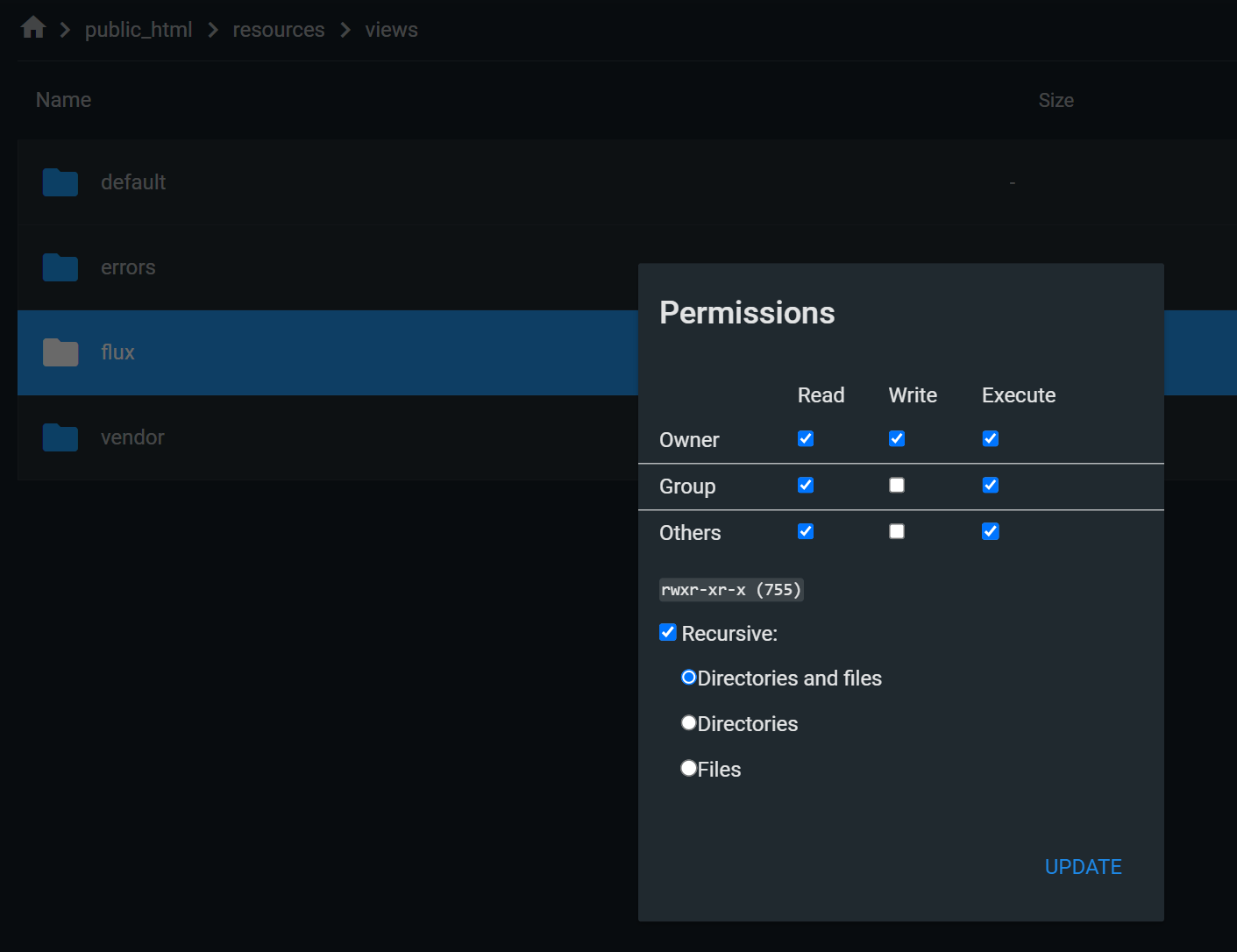
- Go to the /resources/views/flux/ folder.
- Right click on it, and select Change Permissions
- Set the Write permissions and select Recursive for all files and folders.
- Click Ok.
2
Step 2
Go to the Update tab in the Admin Panel, and click on the Install Update button. It will start the upgrade process.
In rare cases upgrade packages can be up to 120MB in size, depending on your Internet bandwidth, download and installation time will vary
3
Step 3
You have successfully completed the upgrade process
13/06/2026
Update process for v1.1
1
Step 1
Go to the Update tab in the Admin Panel, and click on the Install Update button. It will start the upgrade process.
In rare cases upgrade packages can be up to 120MB in size, depending on your Internet bandwidth, download and installation time will vary
2
Step 2
After installation of update package is successfully completed, type in your browser:and hit Enter button. It will run the migration and seeder commands for this specific version only behind the scenes to update the database tables.
3
Step 3
You have successfully completed the upgrade process